

Hy-Nomas on TPU
Tencent Hunyuan’s open video world model, playable in your browser from a Google Cloud TPU v6e-4. You type a world (or pick one), then move through it with the keyboard while it generates 1280x704 video at 24 frames per second, 5 seconds at a time. With Tencent’s video decoder (the default) each second of video takes 1.045 s of compute on a v6e-4, slightly slower than real time, so a few frames reach the browser late; with the MASHBOX Fast Decoder (--decoder fast) it takes 0.689 s, faster than real time.
What it is
Section titled “What it is”How it runs:
- Port: plain JAX in src/mashbox/models/hy_nomas. The main model is split over 4 chips; the video decoder runs on 3 of them, in overlapping chunks with a short crossfade so there is no flicker at chunk edges.
- Kernels: this model’s compiled TPU kernels (Culet) ship as one bundle in mashbox-labs/Hy-Nomas-TPU under
kernels/, checked against the sha256 inmodels.jsonbefore use. When the bundle does not match the chip, the JAX version or a shape, that step runs in plain JAX instead (--no-kernelsforces plain JAX everywhere). - Tencent’s code: the prompt template and tokenizer crop, the timed-action offsets and the camera path normalization run Tencent’s own Python code, downloaded from GitHub at a pinned commit and checked by hash before use.
- Weights: Tencent’s own, downloaded from tencent/Hy-Nomas at a pinned revision, with the cinematic LoRA adapter merged in at load the way Tencent’s merge script does it. The text encoder is Qwen/Qwen2.5-VL-7B-Instruct, also at a pinned revision. We do not re-upload them.
What you need
Section titled “What you need”| Chip | Status |
|---|---|
| TPU v6e slice (v6e-4: 4 chips, one VM) | Supported: 4 chips (Performance) |
| TPU v6e (one chip, v6e-1) | One chip: the full pipeline fits on a single TPU v6e chip (32 GB), 2.46 s of compute per second of video, main model quantized. This version of mashbox run starts on a v6e-4 |
| TPU v5e | Not tested yet; the compiled kernels load and run on v5e (Performance) |
| TPU v5p slice (v5p-8) | Not tested yet |
v6e-4 costs $10.80 an hour at Google’s on-demand list price in US regions ($2.70 per chip-hour); the price differs by region (TPU pricing). The chip bills from create to delete.
You also need the Google Cloud CLI set up and TPU v6e quota in your zone: google-cloud.md does that from a new Google account. A v6e-4 needs 4 cores of “TPU v6e cores per project per zone”.
Disk: the first run downloads 87.4 GB into the Hugging Face cache (Tencent’s main model 34.2 GB, LoRA adapter 6.1 GB and video decoder file 31.6 GB, plus 15.5 GB of text encoder files). It fits the v6e-4 VM’s default 100 GB boot disk with 3.9 GB to spare (measured after the install and download). If your disk is smaller or fuller, set HF_HUB_CACHE to a folder with more room before you download; on a v6e-4 VM, /dev/shm holds 355 GB in RAM and is emptied when the VM stops.
Install
Section titled “Install”From your own machine, with the Google Cloud CLI set up (google-cloud.md does that from a new Google account, including TPU quota):
gcloud compute tpus tpu-vm create hy-nomas --zone=asia-northeast1-b --accelerator-type=v6e-4 --version=v2-alpha-tpuv6egcloud compute tpus tpu-vm ssh hy-nomas --zone=asia-northeast1-b -- -L 8790:127.0.0.1:8790If the create command says the zone has no capacity, queue the request instead. A queued request costs nothing while it waits; once Google grants it, the chip bills like a created one:
gcloud compute tpus queued-resources create hy-nomas-request --node-id=hy-nomas --zone=asia-northeast1-b --accelerator-type=v6e-4 --runtime-version=v2-alpha-tpuv6e --valid-until-duration=2hgcloud compute tpus queued-resources describe hy-nomas-request --zone=asia-northeast1-b --format="value(state.state)"Run the second line until it prints ACTIVE, then connect with the ssh line above. A plain create often finds no free v6e-4; a queued request in asia-northeast1-b can be granted in about 14 minutes.
Then, on the VM:
python3 -m pip install uvpython3 -m uv tool install --python 3.12 "mashbox[tpu,hy-nomas]" --extra-index-url https://download.pytorch.org/whl/cpu --index-strategy unsafe-best-match~/.local/bin/mashbox download hy-nomasThe chip’s system Python is 3.10 and JAX for TPU needs 3.12, so uv installs mashbox with its own Python 3.12, the same way as the README. The extra index gives the CPU build of PyTorch, which runs Tencent’s prompt and camera code on the VM’s CPU (without it you get a much larger GPU build); the model itself runs in JAX on the chips. On a v6e-4 the install takes about 6 s. download fetches every file (87.4 GB, about 7 min 40 s on a v6e-4 in asia-northeast1-b), checks each sha256 and is safe to run again; run also downloads what is missing.
On the VM:
~/.local/bin/mashbox run hy-nomas --uiOpen http://127.0.0.1:8790 on your own machine. The server listens on the VM’s 127.0.0.1 only and reaches you through the SSH tunnel, so nothing is open to the internet.
Optional: any other way of reaching port 8790 works too, such as your own tunnel or proxy. The app answers only to localhost and 127.0.0.1, so if yours uses another host name, put MASHBOX_ALLOW_HOSTS=your.host.name in front of the command.
The first start loads the weights and every program the app uses, so typing a new world or action never waits for a compile later. The programs come compiled from mashbox-labs/Hy-Nomas-TPU when your chip, jax, jaxlib and libtpu match the ones they were compiled with: on a v6e-4 the first frame is then on screen 1 min 20.7 s after the command. Without a match the first start compiles them: 10 min 40.1 s, about 9 minutes of it compiling. Later starts reuse the compile cache in ~/.cache/mashbox/xla: the first frame is on screen 1 min 14.8 s (median of 5 starts; 1 min 7.2 s to 1 min 43.6 s) after the command. These times are with the weights still in the VM’s memory, as they are after the download; the first start after the VM restarts reads them from disk again and takes longer. Stop the server with Ctrl-C; it takes 4.8 to 5.6 s to exit and give the chips back. Wait 10 s after the prompt returns before you start mashbox again (see Troubleshooting). When you are done:
gcloud compute tpus tpu-vm delete hy-nomas --zone=asia-northeast1-b --quietgcloud compute tpus tpu-vm list --zone=asia-northeast1-bIf you queued the chip, delete the request instead; it deletes the chip with it: gcloud compute tpus queued-resources delete hy-nomas-request --zone=asia-northeast1-b --force --quiet.
To render a clip without the browser: ~/.local/bin/mashbox run hy-nomas --out out.mp4 --world eagle --windows 4 --keys "w;w,left;w;w".
To try the browser app without a chip: mashbox run hy-nomas --stub on any machine with mashbox and ffmpeg installed. It runs no model: it shows numbered test frames that follow your camera keys, so you can check the controls and the stream.
Options
Section titled “Options”In the browser
Section titled “In the browser”- World: pick a preset world, describe your own (subject, look, scene, style, view, camera), or paste Tencent’s JSON prompt format.
- Timed actions: type an action (“dives steeply, head first”) or pick one, choose when it starts and how long it lasts inside the next 5 s window. While it plays, the video shows “Action now: …”.
- Keys: W A S D move, arrow keys turn and climb or dive. Hold to keep going, let go to stop. Each window replays your holds frame by frame, one window later.
- Camera: turn rate, move speed, rotation scale (Tencent’s
trajectory_rotation_scale, default 2.5) and pitch limit. - Quality preset: “quality” (3 denoising steps plus a separate history pass) is the default; “live” (4 steps) is the option. Both run 4 model passes per 5 s window, so they take the same time.
- Decoder: “Tencent full” (Tencent’s pixel decoder, the sharpest picture) is the default; “MASHBOX Fast” is our own small decoder, faster than real time on a v6e-4 with a softer picture (Performance). It switches at the next window.
- Sync (on by default): the picture stays at 24 fps; when the chips fall behind, it holds for single 1/24 s ticks (counted as “held by sync”) instead of showing frames late. Off: late frames are shown late and the clock jumps after 0.5 s.
- Resync: drops the frames this browser has queued, measures the network delay again and starts every counter from zero.
- Stream numbers under the video: “link” is what your browser receives, measured from its own acknowledgements of each frame; “in flight” is video sent and still on its way (the server keeps it short by dropping frames when your connection falls behind); “key to screen” is the time from your last key press to the first frame made with it.
- Pause, restart, hide the UI (H). The top-left of the video shows which chip it runs on, read from the chip, plus the compute meter and a UTC clock.
New text, typed or preset, does not trigger a new compile: every text is padded to one of two fixed lengths (256 or 512 tokens) and the padding is masked out. Texts longer than 512 tokens are refused with a message.
Command line
Section titled “Command line”All options: ~/.local/bin/mashbox run hy-nomas --help.
| Option | What it does |
|---|---|
--ui |
serve the browser app on 127.0.0.1 (the default when --out is not given) |
--out FILE.mp4 |
render a clip to this file instead of serving the app |
--world ID |
preset world: eagle (default), fish, mars or moon; with --ui it starts on open |
--windows N |
with --out: number of 5 s windows (default 4) |
--keys KEYS |
with --out: keys held per window, ; between windows, , between keys (default w) |
--preset quality|live |
quality: 3 steps plus a history pass (default); live: 4 steps, history from the last step |
--seed N |
noise seed of the first world (default 2701) |
--port N |
browser app port on 127.0.0.1 (default 8790) |
--decoder full|fast |
full: Tencent’s pixel decoder (default); fast: the MASHBOX Fast Decoder (ours, faster, softer picture); the app can switch it live |
--no-kernels |
plain JAX only: slower, same outputs within bf16 rounding |
--cache-dir DIR |
compile cache folder (default ~/.cache/mashbox/xla) |
--stub |
stand-in engine on CPU: the app, controls and stream without the model |
--no-precompile |
compile each program on first use instead of at start |
Variants
Section titled “Variants”This release runs Tencent’s own weights, downloaded as Tencent publishes them and rounded to bf16 when they load onto the chips (the way torch’s .to(bfloat16) rounds).
| File | Weights type | GB | Bits per weight | Quality vs full precision | Speed | Chips |
|---|---|---|---|---|---|---|
| Tencent’s main model (tencent/Hy-Nomas, 8.55 billion weights) plus the cinematic LoRA (1.53 billion) and video decoder (7.89 billion) | fp32 on disk, bf16 on the chips | 34.2 + 6.1 + 31.6 on disk | 32 on disk, 16 on the chips | reference | 1.045 s of compute per second of video | TPU v6e-4 |
| Text encoder (Qwen/Qwen2.5-VL-7B-Instruct) | bf16 | 15.5 | 16 | reference | part of the above | TPU v6e-4 |
Performance
Section titled “Performance”Measured on TPU v6e-4 (on demand, new chips in asia-northeast1-b, europe-west4-a and us-east5-b) with the Hy-Nomas kernel bundle 0.1.0 and JAX 0.11.2 for TPU (~/.local/bin/mashbox env prints the full list), default options, the app in Chrome through the SSH tunnel. The start times were measured with the weights and the compile cache in the VM’s memory (a RAM folder), not read from its disk. Compute is the time the chips take for a 5 s window divided by 5 s (1.00 = real time).
| What | Result |
|---|---|
| Speed, quality preset (the default) | 1.045 s of compute per second of video (median of 87 windows on one v6e-4 and of 27 on a second): slightly slower than real time, so 2 to 5% of frames reach the browser late |
| Speed, live preset | 1.044 to 1.045 (median of 10 windows on each of two v6e-4s) |
| Speed, MASHBOX Fast decoder (quality preset) | 0.689 (median of 77 windows): faster than real time, no late frames in those 77 windows |
Install (pip install uv and uv tool install) |
6 s |
| Download of the 87.4 GB of weights, with sha256 checks | 7 min 40 s in asia-northeast1-b, 7 min 3 s in europe-west4-a, 7 min 14 s in us-east5-b |
| First start, command to first frame on screen | 1 min 20.7 s with the compiled programs from mashbox-labs/Hy-Nomas-TPU; 10 min 40.1 s without a match, about 9 minutes of it compiling |
| Later starts, command to first frame on screen | 1 min 14.8 s (median of 5 starts; 1 min 7.2 s to 1 min 43.6 s) |
| New world from the Describe form or Tencent JSON | ready 6.4 to 8.8 s after Start, first new window on screen 11.7 to 14.3 s after; no new compile |
| Timed action, preset or typed | ready 0.8 to 1.5 s after Inject, on screen 5.6 to 7.0 s after |
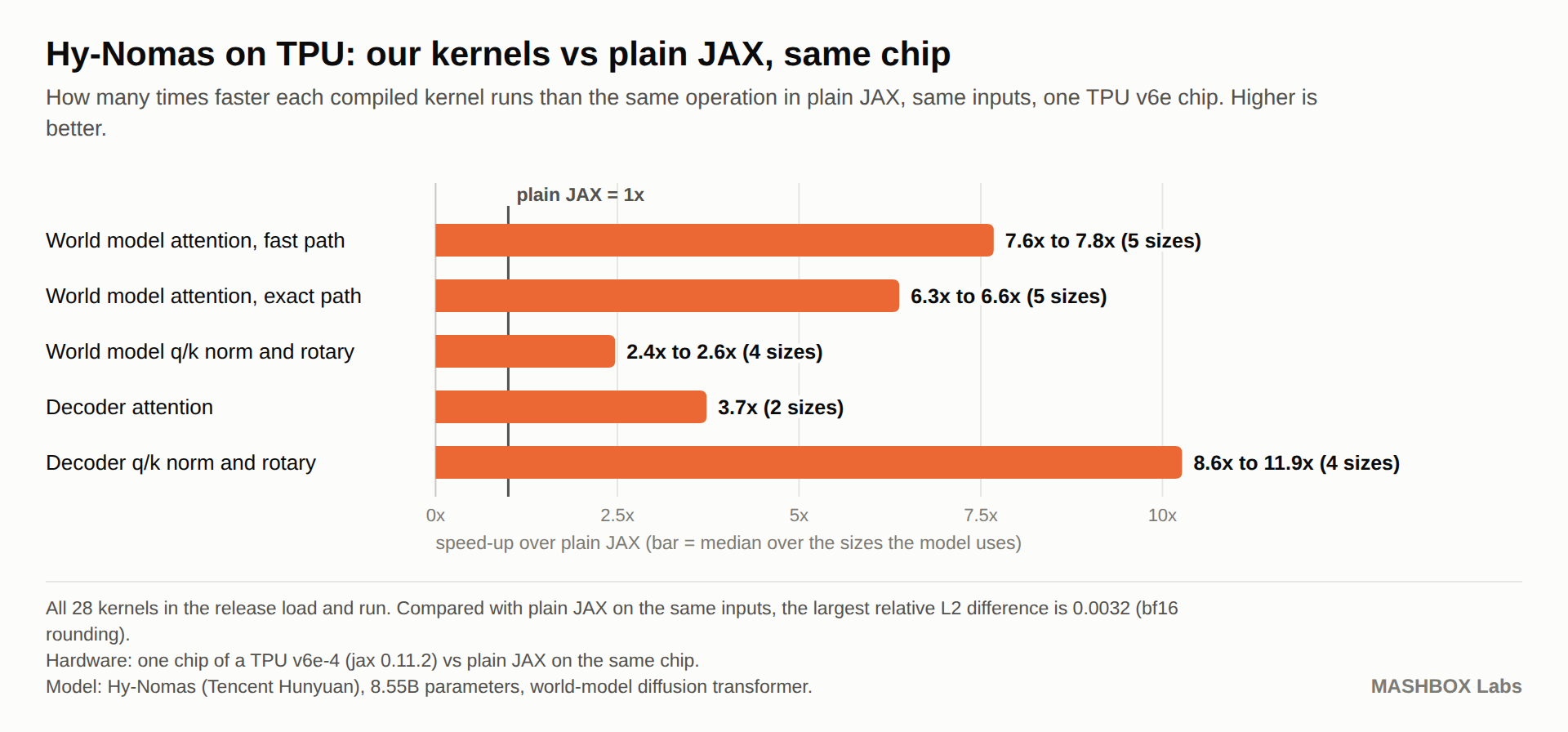
| Compiled kernels against plain JAX on the same chip | 28 of 28 load and run; 4 give identical outputs, the rest differ by bf16 rounding (largest relative L2 difference 0.0032). The main model’s attention runs 7.6 to 7.8 times faster than plain JAX, the decoder’s attention 3.7 times |
Other chips:
| Chip | Result |
|---|---|
| TPU v5e | All 28 compiled kernels of this release load and run on a TPU v5e-1 (JAX 0.11.2 for TPU). Against plain JAX on the same chip: 4 give identical outputs and the rest differ only by bf16 rounding (largest relative L2 difference 0.0032). The model itself on v5e: Not tested yet. A v5e chip has 16 GB, and the video decoder takes 12.99 GiB and its share of the main model about 4 GiB (estimate from measured sizes). |
Use it with your coding agent
Section titled “Use it with your coding agent”Point your agent (Claude Code, Codex, Gemini CLI or any other) at this repo and say: “Run Hy-Nomas for me on a TPU v6e-4 and give me the browser link.” AGENTS.md tells it every step, from a Google account with no Cloud setup to a deleted chip. It asks you before anything that costs money and deletes the chip at the end.
Troubleshooting
Section titled “Troubleshooting”| What you see | Why | What to do |
|---|---|---|
There is no more capacity in the zone or Insufficient capacity when you create the chip |
that zone has no free v6e-4 right now | run the create command again in another zone, and use that zone in every command after it; or queue the request (see Install) |
User does not have permission to submit requests for accelerator type "v6e-4" or Quota limit 'TPUV6EPerProjectPerZoneForTPUAPI' |
your project has no on-demand TPU v6e quota in that zone | ask for 4 cores of “TPU v6e cores per project per zone” in that zone (step 5 of the setup guide) or pick a zone where you have it |
ERROR: No matching distribution found for jax[tpu]==0.11.2 |
plain pip install ran on the chip’s system Python 3.10; JAX for TPU needs Python 3.12 |
use the install lines in Install, which get Python 3.12 through uv |
hy-nomas needs a TPU v6e-4 (4 chips); found ... |
the machine has no TPU or fewer than 4 chips | create a v6e-4 (Install), or use --stub to try the app on CPU |
... sha256 ... does not match the pinned ... |
a download was cut off or changed | delete the file named in the message and run again |
... code hash ... does not match the pinned ... |
Tencent’s code folder in the cache is incomplete or changed | delete the folder named in the message and run again |
a log line "event": "disk" with free_gb below missing_gb |
the cache disk has less free space than the files still to download | set HF_HUB_CACHE to a folder with more room (see What you need) and run again |
Unable to initialize backend 'tpu': ... START_SESSION failed when mashbox starts |
the chips could not be linked into one slice. It can follow a start 0.84 s after the previous run exited, or a server stopped with kill, and can last through 25 minutes and a reboot |
stop the server with Ctrl-C, not kill, and wait 10 s after it exits before the next start. If it happens, delete the chip and create a new one |
could not download the kernel bundle from https://huggingface.co/mashbox-labs/Hy-Nomas-TPU ... |
the VM could not reach Hugging Face, or Hugging Face refused the request | check the VM’s network and run again; --no-kernels runs without the bundle, in plain JAX (slower) |
TPU is already in use by process with pid ... |
another mashbox server is still running on the VM |
stop it with Ctrl-C in its terminal (or kill -INT <pid>), then start again |
mashbox: command not found |
~/.local/bin is not on your PATH until you log in again |
use the full path ~/.local/bin/mashbox |
ModuleNotFoundError: torch (or transformers, yaml) |
the hy-nomas extra is not installed |
run the uv tool install line in Install again |
| a message that the text is too long | texts longer than 512 tokens are refused | shorten the world or action text |
| the picture stops for a moment and then jumps ahead, on a slow connection | the video stream is about 6 Mbit/s. When your connection carries less, the app drops the video it cannot deliver in time and restarts from the next key frame, so the picture stays current instead of falling seconds behind. The readouts under the picture show link, in flight and dropped for network |
use a faster connection, or a chip in a zone near you |
Host not allowed or Origin not allowed (HTTP 403) in the browser |
the page was opened under a host name other than localhost or 127.0.0.1 (your own tunnel or proxy with a domain name), or a page of another site sent the request; the app refuses both so no other site can drive or watch your session |
open http://127.0.0.1:8790 through the SSH tunnel, or start with MASHBOX_ALLOW_HOSTS=your.host.name when you use your own tunnel or proxy |
missing or wrong session token (HTTP 401) |
a proxy in front of the app dropped the X-Mashbox-Token header or the token part of the stream address; the page sends both, with a token made at each start |
pass both through unchanged |
- Does typing a new world recompile the model? No. Every text is padded to 256 or 512 tokens, so new text reuses the compiled programs (see Options).
- Can I run it on one TPU v6e chip or on TPU v5e? One chip: the full pipeline fits on a single TPU v6e chip (32 GB), 2.46 s of compute per second of video, main model quantized. This version of
mashbox runstarts on a v6e-4. TPU v5e: Not tested yet (Performance). - Can I try the app without a chip? Yes:
--stubserves the same browser app with test frames instead of the model (Run). - Where does a rendered clip go?
--out out.mp4writes it on the VM. Copy it to your machine withgcloud compute tpus tpu-vm scp hy-nomas:out.mp4 . --zone=asia-northeast1-bbefore you delete the chip.
Changelog
Section titled “Changelog”| Version | What changed |
|---|---|
| 0.1.2 | First release: runtime in the package (mashbox run hy-nomas, --out, --stub), browser app, timed actions, quality and live presets, text padded to 256 or 512 tokens, kernel bundle in mashbox-labs/Hy-Nomas-TPU with a plain JAX fallback. |
Credits and licences
Section titled “Credits and licences”Hy-Nomas is made by Tencent Hunyuan: tencent/Hy-Nomas. Tencent licenses Hy-Nomas under Apache-2.0; third-party components keep their own licences. Their LICENSE file is kept unchanged in licenses/hy-nomas/LICENSE.
Our code in this repo: Apache-2.0 (see LICENSE). The MASHBOX Fast Decoder weights (decoders/hy-nomas-fast-decoder-v1.safetensors in mashbox-labs/Hy-Nomas-TPU) are ours: Apache-2.0. Compiled kernels: see LICENSE-KERNELS.