

Codex
Codex CLI can use a model that mashbox serves on your TPU as its LLM. This page sets it up for Qwen3.8-27B on one TPU v6e chip. Your own Codex install and your ~/.codex/config.toml stay as they are: Codex reads the settings below from a profile file that you name when you start it. These settings are for Codex CLI 0.165.0.
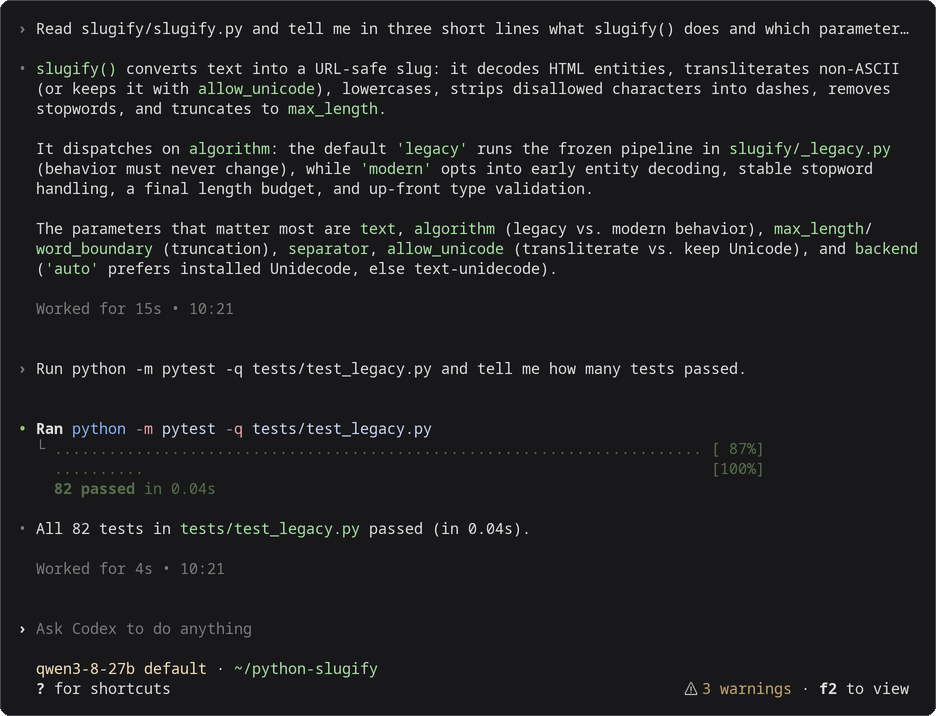
Codex CLI 0.165.0, started with the command in step 2, working against Qwen3.8-27B on a TPU v6e-1. Drawn from the session’s terminal text and colours; nothing edited.
Before you start
Section titled “Before you start”- The
mashboxserver and the SSH tunnel running, from step 1 of Use with coding agents. - Codex CLI installed on your machine.
1. Save the profile
Section titled “1. Save the profile”Codex reads a named profile from its own file next to config.toml. Save this as ~/.codex/mashbox.config.toml:
cat > ~/.codex/mashbox.config.toml <<'EOF'model_provider = "mashbox"model = "qwen3-8-27b"model_context_window = 32768model_auto_compact_token_limit = 26214model_reasoning_effort = "none"
[model_providers.mashbox]name = "MASHBOX TPU"base_url = "http://127.0.0.1:8000/v1"wire_api = "responses"EOF
2. Start it
Section titled “2. Start it”In your project folder:
codex --profile mashboxcodex without --profile mashbox works as before.
3. Check it
Section titled “3. Check it”codex exec --profile mashbox "Reply with one word: ready"It ends with ready. Codex first prints a warning that it has no metadata for the model name (Model metadata for qwen3-8-27b not found): Codex works.
What each setting does
Section titled “What each setting does”| Setting | Why |
|---|---|
model_provider, [model_providers.mashbox] |
send every request to the tunnel, over the OpenAI Responses API (wire_api = "responses"); no API key is needed |
model_context_window 32768 |
the server’s context |
model_auto_compact_token_limit 26214 |
Codex compacts at 80% of 32,768, so its summary still has room |
model_reasoning_effort "none" |
thinking off, even when your own config sets an effort, so long thinking cannot fill the context |
Codex 0.165 refuses a [profiles.mashbox] table inside config.toml when you start it with --profile mashbox: keep the profile in its own file as above.
Context size
Section titled “Context size”Start the server with --ctx 32768 --slots 1: one conversation of up to 32,768 tokens, which is what fits next to the 26.94 GB of weights on a v6e chip. Codex compacts at 26,214 tokens with the profile above. A prompt of 32,768 tokens or more is refused with prompt is too long.
Caching
Section titled “Caching”Codex is built to keep the start of its prompt the same: it sends the whole conversation on every request with the same instructions and tools first, and it adds a short note when your folder or the date changes instead of rewriting the top (its own tests check this). There is nothing to set for caching. Two things to know:
- The title request. After each of your messages the Codex app sends one more short request (about 4,700 tokens) to name the conversation. It asks for the title as JSON and keeps it only if the answer starts with
{(Codex source). Themashboxserver does not apply the JSON format setting on the Responses API (llama-server does not either: issue 21922), so the title is not kept and Codex asks again on the next message. The title request takes the chip’s one slot for a moment; your conversation waits in host memory and comes back from there instead of being read again. Over the 9 turns of the benchmark, that is 188,234 tokens brought back from host memory.codex execsends no title request. - Compaction. Codex compacts on your machine: it sends the history once to be summarised, then a new, shorter history. The new history is read in full (for example 12,132 tokens, 5.3 s to the first token).
What you will see
Section titled “What you will see”The server’s terminal shows one line per request. cached_tokens is the part of the prompt it did not have to read again, and restored_tokens the part of that which came back from host memory. After each of your messages you see the title request ("tools": 0), then your conversation coming back:
{"event": "request", "t": "...", "api": "responses", "ua": "codex-tui/0.165.0 (Ubuntu 24.4.0; x86_64) xterm-256color (codex-tui; 0.165.0)", "session": "...", "queue_s": 1.266, "prompt_tokens": 4663, "cached_tokens": 4499, "restored_tokens": 4499, "new_tokens": 5, "tools": 0, "tool_calls": 0, "thinking": false, "finish": "stop", "dropped_tools": null, "batch_rows": 1, "ttft_s": 1.708, "total_s": 1.923}{"event": "request", "t": "...", "api": "responses", "ua": "codex-tui/0.165.0 (Ubuntu 24.4.0; x86_64) xterm-256color (codex-tui; 0.165.0)", "session": "...", "queue_s": 0.152, "prompt_tokens": 15210, "cached_tokens": 14398, "restored_tokens": 14398, "new_tokens": 22, "tools": 15, "tool_calls": 0, "thinking": false, "finish": "stop", "dropped_tools": ["web_search"], "batch_rows": 1, "ttft_s": 0.913, "total_s": 1.587}dropped_tools names Codex’s web search tool, which runs on OpenAI’s servers and is left out here. In the 9-turn benchmark, with the host-memory cache 86.3% of Codex’s prompt tokens come from the cache, 4 of 38 requests read the whole prompt and the times to the first token add up to 104 s; without it, 51.8%, 21 of 38 and 192 s. See How the server reuses prompts.
Troubleshooting
Section titled “Troubleshooting”| What you see | What to do |
|---|---|
Model metadata for qwen3-8-27b not found |
a warning only; Codex works |
--profile mashbox cannot be used while ... config.toml contains legacy ... [profiles.mashbox] |
move those lines to ~/.codex/mashbox.config.toml as in step 1 |
wire_api = "chat" is no longer supported |
use wire_api = "responses" as in step 1 |
prompt is too long: N tokens > 32767 maximum |
start Codex with --profile mashbox, or start a new session |
Connection refused |
the tunnel is down; run step 1 again |
- Use with coding agents: the server, the tunnel, and the three agents side by side.
- Claude Code and Pi.